1) Eclipse jdk 경로 설정
프로젝트 > Build Path > Configure Build Path > Modulepath > JRE System Library[jdk-17_] > Edit > Alternate JRE 경로를 jdk 저장된 경로로 설정
2) 아스키 코드(ASCII Code)
- 미국 ANSI에서 표준화한 정보교환용 7비트 부호체계
public static void sample4() {
		char var1 = 0x0041;
		//16진수 0x0041과 매핑되는 문자 : 'A'
		System.out.println(var1);
	}

	public static void sample5() {
		char var1 = 65;
		//10진수 65와 매핑되는 문자 : 'A'
		System.out.println(var1);
	}
3) 이스케이프 문자(Escape character)
- 이스케이프 시퀀스를 따르는 문자들로서 다음 문자가 특수 문자임을 알리는 백슬래시(\)를 사용한다.

public static void sample9() {
		String var1 = "홍길동\n프로그래머\n나는\"자바\"를 배웁니다.\n번호\t이름\t직업\n나는\n자바를\n배웁니다.";
		System.out.println(var1);
	}
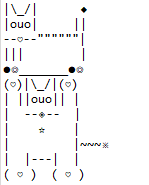
3-1) 이스케이프 활용
public static void sample10() {
		String var1 = "|\\_/|\t   ◆\n|ouo|\t  ||\n--♡--\"\"\"\"\"\"|\n|||\t   |\n●◎_______●◎";
		System.out.println(var1);
	}
public static void sample11() {
    String var1 = "(♡)|\\_/|(♡)\n| ||ouo|| |\n|  --◈--  |\n|    ☆\t  |\n|\t  |~~~※\n|  |---|  |\n( ♡ )  ( ♡ )";
    System.out.println(var1);
}
4) 변수 타입(정수형)
| 타입 | 메모리 크기 | 저장되는 값의 허용 범위 | ||
| byte | 1byte | 8bit | -2⁷ ~ (2⁷-1) | -128 ~ 127 |
| short | 2byte | 16bit | -2¹⁵ ~ (2¹⁵-1) | -32,768 ~ 32,767 |
| char | 2byte | 16bit | 0 ~ (2¹⁶-1) | 0 ~ 65,535(유니코드) |
| int | 4byte | 32bit | -2³¹ ~ (2³¹ -1) | -2,147,483,648 ~ 2,147,483,647 |
| long | 8byte | 64bit | -2⁶³ ~ (2⁶³ -1) | -9,223,372,036,854,775,808 ~ 9,223,372,036,854,775,807 |
public static void sample12() {
    byte var1 = -128;
    System.out.println(var1);
}
public static void sample13() {
    short var1 = 20000;
    System.out.println(var1);
}
public static void sample14() {
    char var1 = 20730;
    System.out.println(var1);
}
public static void sample15() {
    int var1 = 20200730;
    System.out.println(var1);
}
public static void sample16() {
    long var1 = 1998202073;
    System.out.println(var1);
}
5) 디버깅
확인해볼 라인 더블클릭 > debug main >

6) 캐스팅(강제타입변환)
public static void sample23() {
    int intVal = 1;
    byte byteVal = (byte) intVal;
    System.out.println(byteVal);
}

public static void sample24() {
    int intVal = '가';
    char charVal = (char) intVal;
    System.out.println(charVal);
}

public static void sample25() {
    long longVal = 50;
    int intVal = (int) longVal;
    System.out.println(longVal);
}
7) Scanner
public static void scannerSample1() {
    Scanner scanner = new Scanner(System.in);
    String inputString = scanner.nextLine();
    System.out.println("입력된 데이터 : " + inputString);
}

public static void scannerSample2() {
    Scanner scanner = new Scanner(System.in);
    int inputInteager = scanner.nextInt();
    System.out.println("입력된 데이터 : " + inputInteager);
}
8) indexOf()
- 특정 문자나 문자열이 앞에서부터 처음 발견되는 인덱스를 반환하며 만약 찾지 못했을 경우 "-1"을 반환한다.
.indexOf( "찾을 특정 문자" , "시작할 위치" )
시작할 위치는 생략이 가능하며 생략할 경우 0번째 즉 처음부터 찾기 시작한다.
9) Array if문 예제
public static void ifSample2() {
    String var = "저는 52기 홍길동입니다. 현재 교육과정에서는 자바를 배우고 있습니다. 잘 부탁드려요.";
    String objArr[] = new String[3];

    if(var.indexOf("자바") != -1) {
        objArr[0] = "자바 포함";
    }else if(var.indexOf("홍길동") != -1) {
        objArr[1] = "이름 포함";
    }else if(var.indexOf("곤욕") != -1) {
        objArr[2] = "교육 미포함";
    }else {
        objArr[0] = "종료";
        objArr[1] = "종료";
        objArr[2] = "종료";
    }
    System.out.println(objArr);
    //objArr에 담긴 값 : [자바 포함, null, null]
}
10) 부호
int num2 = +num; //num의 부호 그대로 사용
int num2 = -num; //num의 부호 반대로 사용
public static void sample28() {
    int num = -100;
    System.out.println(num);
    int num2 = +num;
    System.out.println(num2); //출력결과 -100
}

public static void sample29() {
    int num = -100;
    System.out.println(num);
    int num2 = -num;
    System.out.println(num2); //출력결과 100
}
11) 증가 연산자
num++ (후위 증가 연산자)
++num (전위 증가 연산자)
public static void sample30() {
    int num = 5;
    int result = num++;
    int result2 = ++num;
    System.out.println(result); //출력결과 5
    System.out.println(result2); //출력결과 7
}
12) 두 수를 입력받아 계산
public static void scannerSample3() {
    Scanner scanner = new Scanner(System.in);
    System.out.println("==입력 시작==");
    float inputInteager = scanner.nextFloat();
    float inputInteager2 = scanner.nextFloat();
    System.out.println("==입력 종료==");
    System.out.println("더하기 : " + (inputInteager+inputInteager2));
    System.out.println("빼기 : " + (inputInteager-inputInteager2));
    System.out.println("곱하기 : " + (inputInteager*inputInteager2));
    System.out.println("나누기 : " + (inputInteager/inputInteager2));
    System.out.println("나머지 : " + (inputInteager%inputInteager2));
}
'JAVA, JSP' 카테고리의 다른 글
| post, get 방식, Wrapper class (0) | 2024.07.10 |
|---|---|
| 생성자 메서드 오버로딩, static, 메서드 오버라이딩, 추상 클래스, 추상 메서드, interface (0) | 2024.07.08 |
| DTO, VO (0) | 2024.07.03 |
| 24.07.02 (0) | 2024.07.02 |
| java - new, 객체참조변수, 필드(전역변수), 지역변수, set/get, default 생성자 메서드 (0) | 2024.07.01 |