※ for문
- for 문의 기본 구조
for (초기치; 조건문; 증가치) {...}
1) 1~10 더하는 예제
public static void loopSample1() {
    int sum = 0;
    for(int i = 0; i < 10; i++) {
        System.out.println("실행"+i);
        sum+= 1 + i;
    }
    System.out.println("합계 : "+ sum);
}
2) 3의 배수 출력
public static void loopSample2() {
    int sum = 3;
    for(int i=1; i<=10; i++) {
        System.out.println(sum*i);
    }
}
3) 구구단(이중 for문)
public static void loopSample3() {

    //1.첫 번째 for문 선언
    for(int i=1; i<=9; i++) {
        //2.첫 번째 for문의 i는 1~9까지 반복하는데, 1부터 시작한다.

        //4.두 번째 for문의 j값이 1~9까지 실행된 후, i는 1씩 증가하므로 1에서 2로 증가한다.
        for(int j=1; j<=9; j++) {
            System.out.println(i + " * " + j + " = " + i*j);
            //3.첫 번째 for문의 i값에, 두 번째 for문의 j값을 곱한다(i는 1, j는 1~9까지 반복/ 1*1, 1*2, 1*3 ...)

            //5.첫 번째 for문의 i가 2로 증가한 후, j는 다시 1~9까지 반복한다.
            //6.i값이 9가 될 때까지 반복한다.
        }
        System.out.println();
    }
}

4) 짝수 구구단(이중 for문)
//1.
public static void loopSample4() {
    for(int i=2; i<=9; i++) {
        if(i%2==0) {
            for(int j=1; j<=9; j++) {
                System.out.printf("%3d", i*j);
            }
        }
        System.out.println();
    }
}

//2.
public static void loopSample4() {
    for(int i=2; i<=9; i+=2) {
        for(int j=1; j<=9; j++) {
            System.out.printf("%3d", i*j);
        }
        System.out.println();
    }
}
※ While문
- 조건식이 true일 경우에 계속해서 반복하고, false가 되면 반복을 멈추고 while문을 종료한다.
- 조건식에 true를 사용하면 while(true){...}가 되어서 무한 반복된다. 이 경우 while문을 빠져나가기 위한 코드가 필요하다.
(while 문을 강제로 멈춰야 할 때 사용하는 것이 break이다.)
- while 문의 기본 구조
while (조건문) {
    <수행할 문장1>;
    <수행할 문장2>;
    <수행할 문장3>;
    ...
}
- while문 무한루프
while (true) {
    <수행할 문장1>;
    <수행할 문장2>;
    ...
}
- while / break
while (money > 0) {
    System.out.println("돈을 받았으니 커피를 줍니다.");
    coffee--;
    System.out.println("남은 커피의 양은 " + coffee + "입니다.");
    if (coffee == 0) {
        System.out.println("커피가 다 떨어졌습니다. 판매를 중지합니다.");
        break;
    }
}
1) 1부터 10까지 출력하는 예제
public static void loopSample5() {
    int i=1;
    while(i<=10) {
        System.out.println(i++);
    }
}
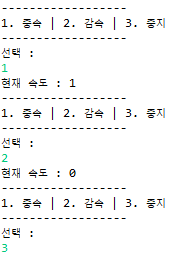
2) 특정 데이터를 입력받을 시 반복문을 종료하는 메서드
public static void loopSample9() {
    Scanner scanner = new Scanner(System.in);
    boolean run = true;
    int speed = 0;

    while(run) {
        System.out.println("------------------");
        System.out.println("1. 중속 | 2. 감속 | 3. 중지");
        System.out.println("------------------");
        System.out.println("선택 : ");

        String inputData = scanner.nextLine();
        if(inputData.equals("1")) {
            speed++;
            System.out.println("현재 속도 : " + speed);
        }else if(inputData.equals("2")) {
            speed--;
            System.out.println("현재 속도 : " + speed);
        }else if(inputData.equals("3")) {
            run = false; //실행중지
        }
    }
}
3) 정수형 데이터를 입력받고 일정 확률이 넘어간다면 반복함
public static void loopSample8() {
    int num = 0, sum = 0;
    Scanner scanner = new Scanner(System.in);
    System.out.println("입력 : ");

    while(sum<50) {
        sum += scanner.nextInt();
        System.out.println("현재 확률" + sum + "%");
    }
}
***예제 - 숫자 야구 게임
public static void baseballGame() {
    // 정답 숫자 4개를 담을 배열 선언
    int ballNum[] = new int[3];
    // 플레이어가 입력한 숫자를 담을 배열 선언
    int myBall[] = new int[3];

    // 난수 생성을 위한 랜덤객체 생성
    Random rd = new Random();
    // 입력을 받기 위한 스캐너 객체 생성
    Scanner sc = new Scanner(System.in);

    // 1부터 9까지의 숫자 4개를 랜덤으로 생성
    for(int gNum = 0; gNum < 9; ++gNum) {
        // 사용자로부터 숫자 4개를 입력받음
        for(int i = 0; i < myBall.length; ++i) {
            System.out.print((i+1) + "번째 숫자 입력: ");
            String input = sc.nextLine();
            //문자열 예외처리
            try {
                myBall[i] = Integer.parseInt(input);
                if(myBall[i] < 0 || myBall[i] > 9) {
                    System.out.println("한 자리 숫자를 입력하세요.");
                    i--;
                }
            } catch (NumberFormatException e) {
                System.out.println("숫자를 입력 해 주세요.");
                i--;
            }
        }


    for(int gNum = 0; gNum < 9; ++gNum) {
        // 사용자로부터 숫자 4개를 입력받음
        for(int i = 0; i < myBall.length; ++i) {
            System.out.print((i+1) + "번째 숫자 입력: ");
            myBall[i] = sc.nextInt();

            // 만약 1~9가 아닌 숫자를 입력하면 다시 입력
            if(!(myBall[i] >= 0 && myBall[i] <= 9)) {
                System.out.println("잘못된 입력입니다.");
                i--;
            }
        }

        System.out.print("입력한 숫자: ");
        for(int i = 0; i < myBall.length; ++i) {
            System.out.print(myBall[i] + " ");
        }
        System.out.println();

        int strike = 0;
        int ball = 0;
        int out = 3;

        // 숫자의 위치와 개수를 비교해서 결과 출력
        for(int i = 0; i < 3; i++) { // i 0시작
            for(int j = 0; j < 3; j++) {
                if(ballNum[i] == myBall[j]) {
                    if(i == j) {
                        //System.out.print("S ");
                        strike++;
                    } else {
                        //System.out.print("B ");
                        ball++;
                    }
                }
            }
        }

        out -= (strike + ball);
        System.out.println(strike + "Strike " + ball + "ball " + out + " out");
        if(strike==3) {
            break;
        }

        // 2S 1B 0O
        // 정답 숫자
        /*
         * System.out.print("정답 숫자: "); for(int i = 0; i < ballNum.length; ++i) {
         * System.out.print(ballNum[i] + " "); } System.out.println();
         */
    }

    System.out.println("게임 종료");
}
'JAVA, JSP' 카테고리의 다른 글
| java 6장- 객체지향프로그래밍 (0) | 2024.08.01 |
|---|---|
| java 5장 - 참조타입, 배열, 다차원배열, 열거 (0) | 2024.07.31 |
| java - 논리연산자, 대입연산자, 삼항연산자 (0) | 2024.07.18 |
| JDBC(Java data base connectivity) 프로그램 순서 7단계 (0) | 2024.07.18 |
| setAttribute, getAttribute, request.getParameter, session객체, JDBC 프로그램 순서 7단계 (1) | 2024.07.16 |