html-css 파일 연결 : <link rel="stylesheet" type="text/css" href="../css/common.css">
body 안의 내용 모두 빨간글씨로 변경 : * {color:red;}
태그선택자 : <div style="color:red; font-weight: lighter">div입니다.</div>
태그에 id, class 속성 부여 및 값 적용
<p id="userName">홍길동</p> /웹페이지 문서 내에 id는 중복 불가
<div class="user-list-cont">유저정보 영역</div> /웹페이지 문서 내에 class는 중복 가능
<style>#list2 {color:red;} .class-list {color:red;} </style>
<body><li id="list2">목록2</li><li class="class-list">목록5</li> </body>
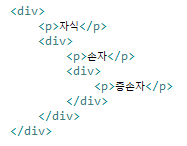
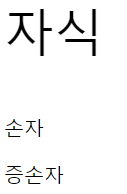
body div p {font-size:20px;} /* 자손선택자 */
body > div > p{font-size:50px;} /* 자식선택자 */
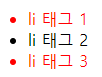
<style> ul li.custom-class {color:red;} /* 복합클래스 */ </style>
<body> <li class="custom-class">li 태그 1</li><li>li 태그 2</li><li class="custom-class">li 태그 3</li> </body>
/* 인접형제 선택자 + */
h1 + div {color:red;}
/* 일반형제 선택자 + */
h2 ~ div {color:red;}
<h1>인접 형제 선택자 예제</h1>
<div>div 요소1</div>
<div>div 요소2</div>
<div>div 요소3</div>
<h2>인접 형제 선택자 예제</h2>
<div>div 요소1</div>
<div>div 요소2</div>
<div>div 요소3</div>

※ 가상 클래스 선택자 : 링크가 걸린 문자에 스타일을 부여하는 것.
선택자 뒤에 :가상이벤트를 붙이면 특정 이벤트마다 적용 할 스타일을 설정 할 수 있으며, 이를 가상 (추상)클래스라 한다.
- :link - 방문한 적이 없는 링크
- :visited - 방문한 적이 있는 링크
- :hover - 마우스를 롤오버 했을 때
- :active - 마우스를 클릭했을 때
- :focus - 포커스 되었을 때 (input 태그 등)
- :first - 첫번째 요소
- :last - 마지막 요소
- :first-child - 첫번째 자식
- :last-child - 마지막 자식
- :nth-child(2n+1) - 홀수 번째 자식
'HTML, CSS' 카테고리의 다른 글
| html/css 구현 (0) | 2024.06.27 |
|---|---|
| CSS - 선택자(기본, 복합 , 가상클래스, 가상 요소, 속성) (0) | 2024.06.20 |
| HTML - html 태그(제목, 목록, 미디어, 테이블, input, radio, textarea, form, button), Eclipse 단축키 (0) | 2024.06.19 |